
Users Guide



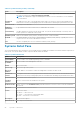


Table 4. System Inventory Table (continued)
Field Description
For more information on the management controller functionality supported by each feature level, access
the online licensing portal at dell.com/support/retail/lkm.
NOTE: Not all hardware supports all management features. For more information, see the hardware
documentation.
Purchased
License
The highest license class of any perpetual license bound to the system is shown. Both installed licenses
and licenses in inventory awaiting deployment are included when calculating the purchased license class.
Entitlement ID The unique license identifier.
Additional
Information
If a potential EULA violation is detected, it is indicated in this column.
Last Inventory The date and time the system was last inventoried. The systems will automatically re-inventory when a
license operation is conducted on the system.
Modular System Name of the modular system (chassis) in which the server or sled is installed.
Node ID The unique identifier of the server or sled installed in a modular system (chassis). Typically, the Service
Tag of a server or the server node identifier of a sled.
Slot The slot occupied by the server or sled in the modular system (chassis).
Systems Detail Pane
The system details pane shows information on a licensable system, including the installed licenses and licensable components of
that system. The system details contains component details and license details.
Table 5. Systems Detail Pane
Field Description
System Name The host name of the installed operating system, if available.
Management
Controller
The host name of the management controller.
Model The system model.
Service Tag The service tag of the system.
Discovery
Address
The IP address or hostname at which the management controller was discovered.
Purchased
License
The highest license class of any perpetual license bound to the system is shown. Both installed licenses
and licenses in inventory awaiting deployment are included when calculating the purchased license class.
Current License The current license on the system.
Installed
Licenses
The list of licenses that are installed on the system.
Remove License Select a license in the Installed License grid, and click Remove license to remove a license installed on
the system.
Selected Click check box to select the license.
Status The license status:
● Green — The license is ok.
● Yellow — The license has a potential problem.
● Red — The license is not functional.
Description The license description.
Entitlement ID The unique license identifier.
28 Systems — Reference