
User manual




Local Mode
ProMaster 2500 User Manual F-5
Text Content
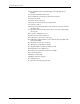
The TEMPORARY text file is ready to edit when the 2500 displays:
Any text on the left side of the display is from the last file edited and
COLUMN
X
and ROW
X
refer to the position of the cursor.
Up to three lines of text with 25 characters per line are available, but the
number of lines and characters that will fit on a device is limited by the
size of the device, label, and type (font). Enter the text you want on the
label. Existing text is overwritten.
To delete a character, move the cursor one space to the right of the
character you want to delete, and press
DEL
. To insert a space between
two characters, move the cursor to the right of the place you want to add
a space, and press
SHIFT
and
SPACE
at the same time.
When you are finished editing, press
STOP
.
Note: Pressing
RESET
cancels the operation and returns you to the Main
Menu.
Labeling a Device
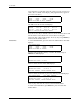
When the file has been selected, the 2500 displays:
To complete the label only operation follow these steps:
1. Lower the hood.
2. Enter the appropriate number and press
ENTER
. The 2500 displays:
3. Press
START
to begin labeling. The 2500 displays:
The 2500 waits until devices are loaded and then labels devices until none
are available. Press
RESET
to return to the Main Menu.
SAMPLE | TEMPORARY FILE
PROMASTER | COLUMN X ROW X
2500 TEXT | PRESS STOP WHEN
| EDITING IS COMPLETE.
LABEL ONLY FILE NAME: FILE3
ENTER NUMBER OF PARTS PER TUBE (15): _
SAMPLE FILE NAME: FILE
TEXT PART TYPE: PLCC 20
FILE PART LENGTH: .390
123456789 PRESS START TO BEGIN
LABEL ONLY FILE NAME: FILE3
COMM: NO INTERFACE PART TYPE: PLCC 20
PART PER TUBE: 15 PART LENGTH: .390
PART TOTAL = 0 PROGRAM TARGET: INF