
User manual




Local Mode
ProMaster 2500 User Manual F-3
3. Select the file you want to use for this operation. Use the arrow keys
to scroll through the filenames. Press
↓
to scroll down the list of
filenames and press
↑
to back up. Use
←
and
→
to move the cursor
across the columns to the file you want to use and press
ENTER
.
In most cases you will be running in this mode to perform some test on
the 2500’s operation. If you want to create a test label file and do not want
to save the file for later use, select TEMPORARY as your file. The contents
of this file are deleted when the 2500 is turned off.
Selecting an existing file shortens the process because it bypasses the text
file creating steps If you select an existing file, proceed to the section
called “Labeling a Device” on page F-5.
Creating a Temporary File
The process of creating a Temporary file includes selecting the following:
1. Device package (either existing or custom)
2. Type size
3. Orientation of device pin 1 in input tube
4. Position of the label on the device
5. Device orientation in output tube
6. Text
Scroll to the Temporary file using the arrow keys and select it by pressing
ENTER
.
Selecting a Device
Package
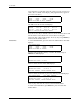
The 2500 displays:
Select either an existing device or a custom device as described below.
To select an existing device package, use the arrow keys to move to the
type you want and press
ENTER
. Only eight selections appear on the
display at one time; press
↓
to scroll to the ones not visible on the display.
To select a custom device for which you determine the length, move the
cursor to CUSTOM, and press
ENTER
. The 2500 displays:
Type the length of your device in inches, up to three decimal places and
under 2.250 inches. Press
ENTER
. If you type an invalid number, the
2500 displays:
Type a valid number and press
ENTER
.
PROGRAM/TEST LABEL TEMPORARY FILE
CUSTOM PLCC 20 PLCC 28 PLCC 32
PLCC 44 PLCC 52 PLCC 68 PLCC 84
MOVE TO SELECTION THEN PRESS ENTER
PROGRAM/TEST LABEL TEMPORARY FILE
ENTER PART LENGTH: _
EXAMPLE: 1.234 OR .28 OR 1
PROGRAM/TEST LABEL TEMPORARY FILE
ENTER PART LENGTH: _
LENGTH CAN NOT EXCEED 2.250