
User manual




Local Mode
F-2 ProMaster 2500 User Manual
3. Press
2
to select the thermal printer. This reconfigures the 2500 so that
it operates with a thermal printer installed.
The Main Menu Commands
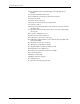
The 2500 will display the following Main Menu:
Press the number key corresponding to the optional menu you wish to
access and the 2500 will display the new menu. This manual will describe
these menus in the order that these appear on the display from top to
bottom.
Operations Menu
This menu lists operations that instruct the 2500 to perform an operation.
From the Main Menu, press one of the numbers to select the option you
need to access.
The Device Programming
Operations
These commands are not to be used during normal operation. They are
available to the service technician to perform tests to assist in assessing
programming related problems. The service commands on this menu are:
•Program/Test & Label
•Load Master
• Program/Test Only
Label Only
This command is useful when you want to print and apply labels to
devices. When this is selected, the programming station is bypassed. All
devices are labeled and directed to the nearest receiving tube. Category
assignments are inactive in this mode.
1. From the Main Menu, press
1
to select OPERATIONS. The 2500
displays:
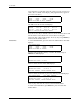
2. From the Operations Menu, press
4
to select LABEL ONLY. The 2500
displays:
* * PROMASTER 2500 MAIN MENU * *
ENTER THE NUMBER OF THE DESIRED FUNCTION
1 - OPERATIONS 3 - SYSTEM SETUP
2 - FILE UTILITIES 4 - DIAGNOSTICS
* * * OPERATIONS MENU * * *
1 - PROGRAM/TEST & LABEL 4 - LABEL ONLY
2 - LOAD MASTER 5 - PRINT ONLY
3 - PROGRAM/TEST ONLY 6 - PURGE
LABEL ONLY
TEMPORARY FILE1 FILE2 FILE3
FILE4 FILE5 FILE6 FILE7
ENTER FILE NAME: