
User manual







Computer Remote Control
ProMaster 2500 User Manual E-21
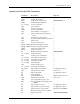
Summary of Extended CRC Commands
Command Description Response
01] Display system configuration SSSS/AAAA/MM/PP/II/JJ>
nn
02] Set upload wait time >
n
03] Set device ID verify option HHHHHHHH> or >
nn
04] Set Handler port baud rate >
xxx...xxxx
05] Set host command >
n
06] Select data bits >
n
07] Set next set member >
nn
22] Set data word width >
n
23] Select number of verify passes >
n
24] Select security fuse programming
option >
n
26] Specify logic verify options >
n
27] Set/clear enable/disable security fuse >
n
28] Fill fuse map >
n
29] Set reject count option >
hhh
2A] or
hh
2A] Enable programming options >
hhh
2B] or
hh
2B] Disable programming options >
nhh
2C] Select memory fill option >
hh
2D] Vector test options
2F] Return 8-character sumcheck HHHHHHHH>
xxx...xxxx
30] Set data file name >
n31] Set data source/destination >
xxx...xxxx
33] Select device manufacturer >
xxx...xxxx
34] Select device part number >
xxx...xxxx
38] Load file from disk >
xxx...xxxx
3B] Delete disk file >
n
3C] Set data transfer port >
xxx...xxxx
3E] Select Keep Current file >
40] or
n
40] Upload device information
See Application Note
*
n
41] Upload self-test results AAA...AA>
43] Upload yield tally See Application Note*
46] Clear yield tally >
49] Suspend CRC mode Displays terminal screen
n
4A] Get filename from disk AAA...AA>
n
4D] Select algorithms type (0, 1, 2, 3) >
n
52] Select algorithm media (floppy disk
or MSM) >
54] Upload device footnote See Application Note*
55] Upload device-specific message See Application Note*
56] Upload memory verify failure
dd
PAAAAAAAAHH
hh
57] Returns checksum of last operation >
58] Upload system ID HHHH HHHH HHHH>