
User manual







Computer Remote Control
E-20 ProMaster 2500 User Manual
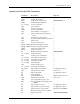
Summary of Standard CRC Commands
Command Description Response
–Invert RAM >
hhhhhh
: Select device begin address >
hhhhhh
;Select memory block size >
hhhhhh
< Select memory begin address >
nn
=Select I/O timeout >
fffppp@ or
ffpp
@Select device type >
cffA Enter translation format >
BBlank check >
C Compare to port >
D Set odd parity >
E Set even parity >
F Error status inquiry HHHHHHHH>
G Configuration inquiry DD>
HNo operation >
IInput from port >
JSet 1 stop bit >
KSet 2 stop bits >
L Load RAM from device >
hh
M Enter record size >
NSet no parity >
O Output to port >
PProgram device >
Q Swap nibbles >
R Return status of device AAAAA/BB/C>
S View sumcheck HHHH>
T Illegal-bit test >
hh
U Set nulls >
V Verify device >
hhhhhhhh
W Set I/O offset >
X or
n
X Error code inquiry HH....HH>
Y Display parity errors HHHH>
Z Exit remote control None
[ View device family/pinout code FFFPPP>
\Move memory block>
hh
^ Clear/fill RAM with data >