
User manual







Computer Remote Control
E-18 ProMaster 2500 User Manual
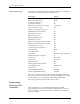
CRC Default Settings
When CRC mode is entered, certain defaults are set prior to accepting any
commands. The default settings are outlined below:
If you exit remote mode using the
Z
command, the 2500 programming
electronics' parameters are set to the values they held
before
you entered
remote mode. If you exit using
C
TRL
+
Z
, the 2500 programming
electronics' parameters remain at their current values.
Programming
Electronics CRC
Commands
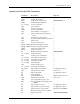
CRC commands are a set of simplified commands for the 2500
programming electronics. The commands are designed to be received
from a controlling computer. Because the commands are so simplified,
they can be cryptic.
Description Setting
Upload/download port Programmer port
Data source/destination RAM
Security fuse data (0 or 1) 0
Program security fuse No
Reject option (commercial or single) Commercial
Logic verification option All
Number of verify passes (0,1 or 2) 2
Fill RAM before downloading No
Illegal bit check option No
Blank check option No
Enable yield tally option No
EE bulk erase option No
Odd/even byte swap for 16 bit option No
JEDEC I/O translate DIP/LCC option Yes
Continuity check option Yes
Compare electronic signature Yes
Host command Blank
I/O address offset 0
I/O format MOS technology (format 81)
Instrument control code (0,1, 2) 0
I/O timeout 30 seconds
Upload wait 0 seconds
Number of nulls 255
Serial set auto-increment mode No
Programming mode Single device
Total set size 1
Upload EOF delimiter flag Disabled
Download EOF delimiter flag Disabled