
User manual







Computer Remote Control
E-14 ProMaster 2500 User Manual
The following diagram illustrates an example of pin 1 orientations for the
three locations:
The rotation byte in binary is 00010011. Convert 00010011 binary to 13
hex. The record becomes
Q70213EA.
Q8
Reserved for future use.
Q9
A termination record for a block of label records. There is no data field.
Only one termination record is used in a Label Hex Format file. Usually,
only one header record is used, although multiple header records are
allowed.
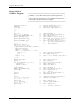
Creating Hex Label
Records
You can create a Hex Label Format file using a standard text editor,
although it is easier to use a program that can create a Hex Label Format
file, such as the LABEL program included with the ProMaster 2500. You
can use this program, which is written in the C programming language,
on any computer able to run a C compiler. The LABEL program creates a
file named
label.hex
after you enter the labeling information. You can
compile the source for this program, included in this chapter, using any C
compiler.
Example of the Hex Label
File Format
A typical Hex Label Format file used for downloading labeling and
device information to the 2500 is shown below:
Q001FE
Q10C4C4142454C0D544558540D34
Q20201FC
Q60202FB
Q70213EA
Q901FE
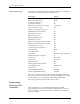
The elements of this file are one Q0 record, one Q1 record defining the
labeling information “LABEL,” CR, “TEXT,” CR a Q2 record defining the
device type, a Q6 record defining print density information, a Q7 record
defining pin 1 orientation, and one Q9 record.
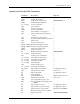
One Q0 record comprised of the following character pairs:
Q0
Label record type — Q0 indicates a header record.
01
Record length — Indicates that 1 hex byte follows in the record.
FE
Checksum.
The Q1 record consists of the following components:
INTO RECEIVING
TUBE = 01 (1)
PIN 1
LABEL
ORIENTATION = 0
DIRECTION OF TRAVEL
TXT
PIN 1
PIN 1
OUT OF
INPUT TUBE = 11 (3)
1393-1