
User manual





Computer Remote Control
ProMaster 2500 User Manual E-3
Remote Mode
Command Set
All remote commands begin with an @ symbol followed by a two-digit
number, with the exception of the reset command (!) and the devices
labeled command (#). After the command is issued, the 2500 responds
with an R followed by two to four ASCII digits and a CR-LF, except in the
case of the Exit Remote and Reset commands, when no response is
returned.
Note: CR-LF means Carriage Return and Line Feed (0D hex and 0A hex). A
CR-LF is sent after every response from the 2500.
All numbers are in decimal, with the individual digits represented in
ASCII, except for the Escape character in the transparent mode command.
Summary of Remote Mode
Command Set
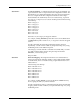
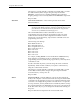
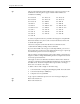
Command Description Response
@@01
XX
Program and label parts - continuous R01
@02
XX
Set up R02
@03
XX
Program and label devices R03
@04 Request firmware version R
XXX
@05 Exit remote mode None
@06
XXX
Set up label placement R06
@07
XXYYY
Bin assignment R07
@08
XXX
Bin label mapping R08
@09
XXX
Serial control functions R09
@10
X
Transparent mode R10
@11
XX
Label only devices - continuous R11
@12
XXXX
Program and label devices R12
@13
XXYYZZZZ
Variable text mode Varies
@14
X
Send variable text R14
@15 Download device table Device table
and R15
@16
X
Retry devices in programming module R16
@17
X
Define pass category R17
@18 Handler identification R2500
@21 Print only R21
@22 Purge R22
@23X Contact adjust R23
# Request number of devices labeled R
XXXX
! Reset None
* Terminate job R* after last
part is sorted