
User manual





Introduction
1-12 3/97 ProMaster 2500 User Manual
Display
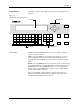
The 160-character, 4-line, back-lit display prompts you with menus
during setup and diagnostic testing and for all operations in local mode.
ON
—A green LED behind this status indicator is on whenever the
system is turned on. This is not a control key.
Main Menu
—The 2500 Main Menu is shown below.
Making a Selection
—To make a selection from a menu, enter the
number of the function you want to use. That function’s sub-menu will be
displayed.
Default Values
—On most of the front panel messages, the 2500 displays
the default value in parentheses. If you press
ENTER
without making a
change, the default value is entered.
Prompts
—To respond to a prompt, type the appropriate entry from the
keyboard. To answer Yes, press
Y
.
Keyboard
From the keyboard you can enter upper- and lower-case letters as well as
special characters. These are selected by pressing
SHIFT
and the
character key at the same time.
All keys except
ENTER
are auto-repeating, with a half-second delay.
The message
PRESS ANY KEY TO CONTINUE
does not apply to
SHIFT
or
LOWER CASE
. These keys are used most often to configure the 2500 to
operate in remote (
LOWER CASE
+
R
) and local (
LOWER CASE
+
L
)
modes.
Arrows
—Use the
↑
,
↓
,
←
, or
→
arrow keys to move the cursor.
* * * PROMASTER 2500 MAIN MENU * * *
ENTER THE NUMBER OF THE DESIRED FUNCTION
1 - OPERATIONS 3 - SYSTEM SETUP
2 - FILE UTILITIES 4 - DIAGNOSTICS