
User manual





Glossary
A-6 ProMaster 2500 User Manual
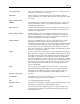
PLD
An acronym for Programmable Logic Device. A particular type of
programmable integrated circuit. Architectures range from being very
simple to very complex. Most PLDs contain two levels of logic: an AND
array followed by an OR array.
PROM
An acronym for programmable read-only memory. A device with fixed
AND and programmable OR arrays. This is a slightly different
architecture from an FPLA or a PAL.
Process
A series of device related operations are combined to form a process for
each Task. The device related operations that can be selected are: Blank
Check, Illegal Bit Check, Program, Verify, and Label.
Programmable Integrated
Circuit (PIC)
One of the four basic categories of ASICs — the other three being gate
arrays, standard cells, and full custom devices. PICs are user
configurable. PLDs and FPGAs are examples of programmable integrated
circuits.
Programming Block
The socket on the programming module where the 2500 inserts devices
for programming. The module’s contacts are mounted in the
programming block.
Programming Electronics
(PE)
The electronic assembly in the 2500 base that controls the electrical
signals required to perform device test, program, and verify operations.
Often referred to as “PE” in the documentation.
Programming Module
The interface between the 2500 programming electronics and the device.
The programming module routes signals from the pin driver head to the
device pins.
Programming Station
The cut-out portion of the main plate where the programming module is
installed.
Remote Mode
One of two system operation modes for the ProMaster 2500. In this mode,
the 2500 is configured to respond to commands sent by TaskLink. This is
the primary operating mode for the ProMaster 2500. The other system
operating mode is called Local mode.
Security Fuse
A location in a programmable device that, when programmed, secures
the device from readback: the data in the device becomes unreadable.
Security Fuse Data
The data programmed or that will be programmed into the device’s
security fuse.
Security Option
A programming parameter defined in the Task the enables or disables the
programming of the device’s security fuse.
Select Device
A procedure that tells the 2500 programming electronics what device you
will be using. You select a device by choosing the manufacturer and
device part number off a list on TaskLink’s screen.
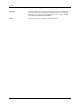
Self-test
A command that tests various circuits and subsystems in the 2500
programming electronics, verifying proper operation or isolating possible
problem areas.