
User manual






Repair and Replacement Procedures
7-28 ProMaster 2500 User Manual
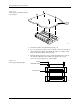
24. Place the baffle plate back on the beam and then reinstall all of the
screws in the order shown in Figure 7-18.
25. Carefully re-assemble all of the disconnected cables and components.
Disk Drive Replacement
This procedure describes the steps required to remove and replace the
disk drive.
Replacing the Disk
Drive
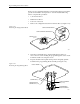
If the disk drive fails, follow the steps below to replace it.
1. Turn off the 2500 and remove the power cord.
2. Disconnect the disk drive power cable.
3. Disconnect the disk drive ribbon cable.
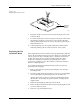
4. Use a 3/32-inch hex wrench to remove the two screws from under
the disk drive mounting plate. Remove the disk drive.
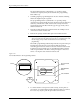
5. Use a 3/32-inch hex wrench to attach the new disk drive to the disk
drive mounting plate and reconnect the power and ribbon cables.
Figure 7-18
Baffle Plate Reinstallation
LO QUICK
CONNECT
(Gray)
HI QUICK
CONNECT (Black)
E CHAIN SCREWS
2338-1
1/4"
SCREWS
1
11
15 5 8 13
19
21
17
1274
6910
16
3
2
14
18
20
22
23