
User manual




Repair and Replacement Procedures
ProMaster 2500 User Manual 7-11
23. Rotate the orbital cam to make sure it spins freely and does not rub
against the underside of the main plate. If you feel or hear the cam
rubbing against something, grasp the outer edge of the cam and
gently pull it approximately 3/32 of an inch away from the underside
of the main plate and recheck it again.
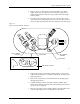
24. Install the collar over the cam spindle. The slit in the collar must be
aligned with the slit in the spindle (see Figure 7-10).
25. Turn the orbital cam one final time to check for smooth rotation with
no rubbing.
Replacing the
Output Orbital
Motor
Follow the steps below to access and replace the output orbital motor.
1. Turn off the 2500 and remove the power cord.
2. Remove the PE assembly, as described on page 7-3.
3. Locate the round output orbital motor collar. Loosen the 7/64-inch
hex screw and remove the motor collar.
4. Disconnect the Molex motor cable J-13. The end of this connector is
located under the main plate and will not fit through the main plate
hole. You must remove the four pins in the connector to free the
cable. Note the wire colors and the wire positions in the connector
(see Figure 7-9).
5. Use a Molex pin extractor tool to remove the four pins from the white
plastic connector.
6. After you've removed the four pins, pull the cable through to the top
of the main plate.
7. Remove the 3/32-inch hex screw that holds the grounding strap to
the left support brace.
8. Remove the two 3/32-inch hex screws that hold the optic block to the
underside of the main plate. Slide the optic block off the dowel pin.
9. From above the main plate, remove the two 3/32-inch hex screws
holding the right orbital alignment block to the main plate. Slide the
block out and set it aside.
Figure 7-10
Align the Slit in the Collar with
the Slit in the Spindle
2297-1
INCORRECT ALIGNMENT CORRECT ALIGNMENT
SLIT IN COLLAR
SLIT IN SPINDLE
HEX SCREW
COLLAR
SPINDLE