
User manual





Troubleshooting
6-16 ProMaster 2500 User Manual
Figure 6-5
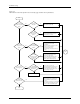
Label Printing Problems, Dot Matrix Printer (page numbers are in parentheses)
Are all
characters sharp
and dark?
Check & replace ribbon (5-57)
Check & adjust print head gap (5-24)
Inspect print head for damaged pins
Replace print head (7-12)
Are
all printed
dots straight &
evenly spaced
?
Run Print Test (5-46)
Run Print Only to test label (F-6)
Clean pinch rollers (5-57)
Check operation of labeler motor (5-40)
Check dot split value (2-26)
Check label supply; try different labels
Are all dots
in characters
printed?
Run Print Test (5-46)
Check +24V labeler power supply (5-13)
Replace print head (7-12)
Check/swap cable
Check label supply
Replace ribbon (5-57)
Are all
characters printed
on label?
Run label calibration (2-11)
Check ADC optic adjustment (5-34)
Check labeler motor; check 36V (5-13)
Check label supply
Yes
Yes
Yes
No
No
No
No
Yes
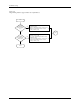
Does
labeler print
anything?
Run Print Test (5-46)
Check labeler power supply (5-13)
Check cables
Replace ribbon (5-57)
No
Yes
Start
Go to
Start