
User manual





Troubleshooting
6-10 ProMaster 2500 User Manual
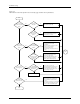
Figure 6-2
The Beam Does Not Pick Up the Device Correctly (page numbers are in parentheses)
Does device
exit tube?
Does device
get to pick-up
point?
Does
beam move
smoothly & align
over pick-up
point?
Is
device in correct
position at pickup
point?
Is beam
over pick-up
point?
Does beam
move along lead
screw?
Check +90V beam voltage (5-13)
Check motor fuses F5 to F8
(schematic)
Check motor driver circuit U25 to U27
and Q1 to Q4 (schematic)
Check flex coupler (7-21)
Check wiring & connectors for traverse
motor
Adjust track width (4-12)
Adjust track height (5-64)
Adjust track width (4-12)
Check tube input motor test (5-32)
Check devices for residue
Check for mechanical obstructions
Check +90V beam voltage (5-13)
Check flex coupler (7-21)
Clean & lubricate lead screw (5-63)
Reduce beam motor speed (B-3)
Replace anti-backlash nut (7-24)
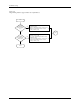
Does beam
lower to device
?
Is something
blocking full beam
movement?
Check low pressure air (2-7)
Check beam up/down solenoid (5-38)
Check beam down optic test (5-32)
Clean & lubricate beam shafts (5-63)
Check wiring & connectors
Clear beam's vertical path
Does
beam pick up
device correctly
?
End
Check chuck size (2-8)
Check high pressure air setting (2-7)
Check alignment of beam to device
4-27)
Clean (5-56) or replace (4-17) chuck tip
Run vacuum sensor diagnostics (5-32)
Clean or replace vacuum filter (5-61)
No
Yes
No
Yes
No
Yes
No
Yes
No
Yes
No
Yes
No
Yes
No
Yes
No
Yes
Start
Go to
Start