
User manual





Troubleshooting
6-6 ProMaster 2500 User Manual
Troubleshooting Flow Charts
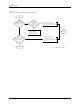
These troubleshooting flow charts help you do the following:
• Isolate the area where the problem is occurring.
• Determine whether a malfunctioning component or assembly
requires cleaning, adjusting, or replacement.
• Go to the page in the manual that describes the appropriate
procedure.
The following flow charts are included on the following pages:
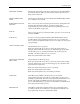
Power-up Failures.........................................................................................6-8
Beam Does Not Pick Up Device Correctly...............................................6-10
Beam Does Not Insert Device Correctly...................................................6-12
Programming Failures................................................................................6-14
Label Printing Problems.............................................................................6-16
Label Application Problems.......................................................................6-18
Beam Does Not Deliver Device Correctly................................................6-22
WARNING:Do not perform any procedure that requires you to lift the
main plate of the 2500 unless you are a service technician
trained on electromechanical equipment.