
User manual





Troubleshooting
ProMaster 2500 User Manual 6-3
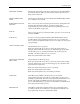
ELECTRONIC ID ERROR
The internal electronic ID of the device that is being programmed did not
match the ID that the 2500 expected. Check that the correct devices are
being used for this Task.
ERROR CLEARED, PRESS
START
This message is displayed when the
DEVICE WAS DROPPED, PRESS START
error condition was corrected.
HARDWARE DID NOT PASS
SELF-TEST
Error occurs when a device-related operation has been attempted for the
first time after turning the 2500 on. A critical assembly in the
programming electronics has failed. Run the programming electronics
self-test as described on page 5-50.
HOOD UP
The hood was up when you started a handler operation. Lower the hood
and press
START
.
ILLEGAL BIT
A device has a bit programmed and the 2500’s RAM indicates that it
should be blank (unprogrammed). If the devices are not erasable, the
device cannot be programmed. If the devices are erasable, try erasing and
reprogramming.
LABEL JAM, PRESS START
The labels did not move properly.
Make sure the label advance rollers are clean, the pinch rollers are
engaged, and the label detection optics are functioning properly. Make
sure the label motor is operating and that the drive belt is properly
installed. Check the pulley for loose set screws.
Make sure that the label reel has labels.
LABELS NOT CALIBRATED,
PRESS START
The labels did not calibrate properly.
Make sure the label advance rollers are clean, the pinch rollers are fully
engaged, and the ADC optics are functioning properly. Check the ADC
optic value in the Optics test.
Make sure that the label advance motor is operating.
Make sure that the label reel has labels.
Make sure that the label stock is not sticking to the liner.
NON-BLANK
The 2500 has detected bits in the device that are not in their
unprogrammed message state and are not illegal bits. The devices are
probably programmable, but will not be programmed and will be sent to
the fail output tube when Blank Check has been selected as a Task
process. The 2500 will try to program a non-blank device if Blank Check
is not selected in the Task’s process.
PROGRAM FAIL
The 2500 has applied the maximum number of programming pulses
according to the device manufacturer’s specifications and the device is
not programmed. The device should be discarded.