
User manual






Preventive Maintenance
ProMaster 2500 User Manual 5-65
Adjusting the Track Width
Cables
All three tracks should have the same track width and be adjusted
equally. If one of the tracks is out of adjustment with the others, you may
have to perform the track width adjustment procedure. To perform the
track adjustment procedure, follow the steps below.
Note: Under normal circumstances the tracks should stay in adjustment and
you should not have to perform this procedure. Make sure you have
correctly determined that one of the tracks is out of adjustment before you
proceed.
1. Turn off the 2500 and remove the power cord.
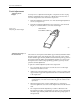
2. Loosen the two screws in the corners of the main plate.
3. Lift the main plate until it stops in the fully upright position.
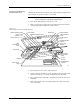
4. To perform a fine track width adjustment, use an adjustable wrench
to tighten or loosen one of the track adjustment nuts (see Figure 5-29).
Turn the nut clockwise to make the track wider or counter-clockwise
to make the track narrower.
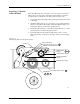
Figure 5-28
Input and Output Track Funnel Adjustment
2284-2
OUTPUT TRACK
TRACK ENTRANCE
(Make wider by .010")
TRACK ENTRANCE
(Make wider by .010")
INPUT TRACK