
User manual






Preventive Maintenance
ProMaster 2500 User Manual 5-63
Cleaning and Lubricating
the Beam Lead Screw
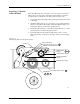
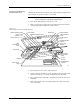
Lubricate the lead screw, beam shaft, and carriage shafts (see Figure 5-26)
approximately every three months or as needed.
CAUTION: This procedure should be performed only by a qualified
service technician or the system administrator.
1. Turn off the 2500 and remove the power cord.
2. With a clean cloth, wipe the lead screw and the front and rear beam
carriage shafts until no lubricant or dirt remains.
3. Move the beam to the center of the lead screw.
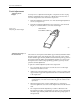
4. Apply four drops of TriFlow, evenly spaced, on each side of the lead
screw and one drop on each side of both beam carriage shafts.
5. Move the beam back and forth so the lubricant works into the screw
and shafts.
6. With a clean cloth, wipe excess lubricant from the sides of the lead
screw and shafts.
Figure 5-26
Location of the Lead Screw and the Carriage
1760-3
CABLE HARNESS
GUIDE
BEAM HEAD
BEAM TRAVERSE
MOTOR
INPUT TUBE
HOLDER
TRACK WIDTH
ADJUSTMENT
KNOB
REAR CARRIAGE SHAFT
LEAD SCREW
FRONT CARRIAGE SHAFT
OUTPUT TUBE
HOLDER (1 of 2)
BEAM CARRIAGE
MAIN PLATE
LABELER
LABEL
APPLICATION
AREA
DEVICE RECESS
(2 of 2)
DEVICE RECESS (1 of 2)
LABEL SUPPLY
REEL
PROGRAMMING
STATION
E-STOP
BUTTON