
User manual






Preventive Maintenance
5-62 ProMaster 2500 User Manual
Follow the steps below to clean the PLCC module’s contacts.
CAUTION: This procedure should be performed only by a qualified
service technician or by the system administrator.
1. Blow compressed air into the top of the programming module to
remove any device package debris. Use a rotating motion with the air
nozzle to ensure that you reach all areas.
2. Use the DeoxIT pen to apply conditioner directly to the module’s
contacts. From the base of each contact, draw the pen’s tip up the
length of each contact.
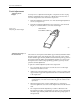
3. Crumple a small amount of soft lint-free cloth, and push it into the
programming module.
4. Install a chuck in the beam, and move it over the programming
station.
5. Set a device, oriented correctly, on the programming module.
6. Move the beam down and up (in a plunging motion) so the device
presses the cloth in the programming module along the full length of
the contacts. Pull on the cloth to lift the device out of the module.
Repeat this process several times.
7. Carefully remove the cloth.
8. With a new cloth, clean the inside of the module (as described in
steps 2 through 5). Repeat the process until the cloth comes out clean
and all the residue is gone.
9. Blow compressed air into the programming module again to remove
any conditioner that has accumulated at low points.
Note: To prevent the first few devices from sticking to the track, be sure to
complete step 9.
10. Insert a clean portion of the cloth into the module to remove any
residual conditioner that may have collected after blowing with the
compressed air.