
User manual






Preventive Maintenance
5-60 ProMaster 2500 User Manual
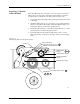
5. Guide the pinch roller back into its operating position against the
drive roller.
6. Use the tape supplied on the end of the leader (or a DIP label) to
attach the leader to the take-up cardboard core.
7. When you install a new ribbon, remove the old ribbon’s cardboard
core and install it on the take-up hub as the new ribbon take-up core.
8. Turn the ribbon take-up roll counterclockwise to advance the ribbon
until it (not the leader) is between the print head and the platen.
Repairing a Torn
Thermal Printer
Ribbon
Under normal circumstances you should not have a problem with the
ribbon tearing. If it does tear, follow the procedure below to repair it.
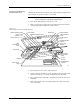
1. Cut the end of the ribbon to remove the tear and create a straight end.
2. Cut about 16 inches (40 cm) of old label liner (hanging from the label
drive roller) to use as ribbon leader.
3. Line up the end of the ribbon with the end of the liner and tape the
two ends together (a DIP label can also be used as a tape splice).
4. Turn the splice over and tape the other side.
5. Wrap the liner around the ribbon roll once, and then follow the
instructions for installing a new ribbon. If the ribbon begins to slide
off the roll while you are threading, place a large label across the edge
of the ribbon roll to stop the unraveling. Remove this label when you
have finished threading and before you start processing devices.
Preventive Maintenance Procedures For Service Technicians
This section of the manual provides the ProMaster 2500 service technician
with a guideline for component cleaning or replacement.
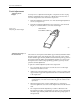
To clean the 2500, you will need the following items:
• Lint-free cloth
• TriFlow® lubricant
•DeoxIT
™
Pen
• Solvent that has been approved for use by your company
• All-purpose spray cleaner
•Isopropyl alcohol
•Cotton swabs
• Compressed air
• Needle-nose pliers
• Hex drivers for hex socket head screws