
User manual






Preventive Maintenance
5-58 ProMaster 2500 User Manual
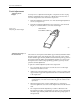
2. Rotate the knob on the new cassette in the direction indicated by the
arrow (counterclockwise) to pull the ribbon taut.
3. Guide the new cassette so the ribbon fits between the print head and
the platen.
4. With the ribbon partially in place over the print head, slowly turn the
ribbon advance knob while applying gentle pressure on the cassette
until it aligns with the ribbon spline drive and drops into place.
5. Calibrate the labels as described on page 4-19.
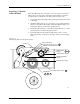
Figure 5-23
Removing the Ribbon Cassette
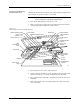
Figure 5-24
Installing a New Dot Matrix
Printer Ribbon Cassette
2296-1
SPRING CLIP
(1 of 2)
RIBBON
CASSETTE
1852-2
PRINT HEAD
SPRING CLIP
(1 of 2)
RIBBON
ADVANCE
KNOB
RIBBON
CASSETTE