
User manual




Preventive Maintenance
ProMaster 2500 User Manual 5-27
Label Calibration
Change the label calibration value using the STOP command described in
the following procedure.
1. Press
STOP
to pause the 2500 while a Task is running.
2. Press
LOWER CASE
+
C
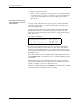
. The 2500 displays:
where
XXX
represents a numeric value for the current setting.
3. Press
↑
or
↓
to change the label calibration value (the range is from 0
to 255). Entering a larger numeric value moves the printed characters
closer to the leading edge of the label.
4. Press
START
to continue running the Task.
Label Advance
The label advance value defines how far a label is extended above the
application plate just before it is applied to a device (see Figure 5-14).
The value can be changed by pressing
STOP
and
LOWER CASE
+
W
.
Increasing the numeric value advances the label farther above the
application plate.
Adjusting the
Thermal Printer
When the thermal printer is operating correctly, the label and ribbon
material advance smoothly and without any binding or excess slack. If
any of the clutches that are attached to the rollers begin to bind, they can
cause the feeding and advancing of both label and ribbon material to go
out of adjustment.
To adjust the thermal printer, follow these steps (see Figure 5-9):
1. Starting with the ribbon (supply) roll hub, check that it has only slight
friction. Remove the ribbon hub and spring washer.
2. Hold the spring washer in your hand and, using small needlenose
pliers, bend the three fingers so they produce less (or more, if
required) friction on the hub.
3. Reinstall the spring washer and hub on the printer. Check that there
is now only slight friction.
4. Print a label and observe the amount of slack in the ribbon when the
printer head pivots up to print. The ribbon should droop down about
3/4” when the print head pivots up. If it does not, loosen the lock nut
on the damper at the top of the air cylinder using small needlenose
pliers, and adjust it counterclockwise with a small flat- blade
screwdriver until the head pivots up fast enough to create the droop.
Then tighten the lock nut with the small needlenose pliers.
PROGRAM/TEST LABEL
SLAVE MODE PART TYPE: DIP 24-.3
PART TOTAL: 251 PART LENGTH: 1.250
LABEL CAL: (XXX)