
User manual






Preventive Maintenance
ProMaster 2500 User Manual 5-11
Label Application
When solenoid
3
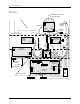
is selected (see Figure 5-15), low pressure air is passed to
the beam assembly. When the 2500 prepares to apply a label on a device,
the beam lowers (with low air pressure) the device on the application
plate, and then solenoid
3
is turned off to bleed the low pressure line. To
prevent the device from being skewed during label application, the beam
rests on the device (with its own weight and no air pressure) as it is
moved across the label.
Chip Blow-off
Devices are released from the chuck tip when vacuum is turned off and
low air pressure is activated to ensure a smooth separation. Beam
solenoid
5
(blow off) is activated, allowing low pressure air into the
vacuum chamber. The low pressure air does not go through the vacuum
venturi because the chamber is pressurized to 30 to 40 PSI. Instead, the air
is forced through the beam and chuck shaft, assisting the chip to separate
from the chuck tip.
Output Track Air
Low pressure air is used on the output tracks to help devices enter the
output tubes. When solenoid
2
is selected, low pressure air is switched to
both output tracks. An in-line valve, called the track air adjustment, is
located on the main plate to the right side of output tube holder 1. The air
level can be adjusted when the system is reconfigured between large and
small devices.
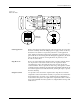
Figure 5-3
Beam Air Holes
16
17
4
5
18
20
21
19
11
12
17
18
21
20
19
2387-1
BEAM AIR
CYLINDER