
User manual





Operation
ProMaster 2500 User Manual 4-35
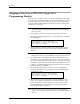
Task Summary Screen
The Task summary screen shows the programming yield in terms of the
number of devices that passed and the number that failed for each
specific error. Press
↵
to continue running the Task, or press
T
AB
to select
<End Session>
and
↵
to stop the Task and return to the main TaskLink
screen.
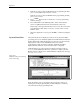
Exiting TaskLink
From the main TaskLink screen, press
T
AB
to select
<EXIT>
and then
press
↵
. A second box appears to confirm that you want to exit TaskLink.
Press
T
AB
to select the
<EXIT>
and then press
↵
again to completely exit
the program and return to the DOS prompt.
Figure 4-29
Task Session Summary Screen