
User manual





Operation
ProMaster 2500 User Manual 4-33
If the device is not aligned properly, release the
D
key, use the arrow
keys to change the position, and lower the beam into the
programming module to check it again.
When you are satisfied with the left-to-right alignment, check the
front-to-back alignment. See if the device is pushing either the front
or the back contact set much more than the other.
7. If both front and back contact sets are being contacted equally, press
START
to begin processing devices.
If the device is not centered front-to-back,
note
whether it is too close to
the
front
or the
back
, and follow the procedure below to readjust its
position.
Adjust Front-to-back
Position
To realign so the device is inserted into the center of the programming
module (front-to-back axis), follow the steps below.
1. Exit the Task or Kit, restart it, and prepare to check the alignment
again.
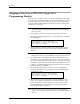
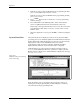
2. The beam will pause above the device and the 2500 displays:
Figure 4-27
DIP Device Alignment
PROGRAM/TEST ONLY
USE ARROW KEYS TO ALIGN BEAM WITH
DEVICE CENTER. PRESS [D] TO LOWER BEAM.
PRESS START TO CONTINUE.
1945-2