
User manual





Operation
4-30 ProMaster 2500 User Manual
Check Front-to-back
Position
9. After the device is centered right-to-left, check its front-to-back
position by looking at the device and programming module from
over the input track.
10. If the device is centered over the programming module in the front-
to-back axis, press
START
to resume operation.
If the device is not centered front-to-back,
note
whether it is too close to
the
front
or
back
, and perform the following steps to readjust its position.
Adjust Front-to-back
Position
To realign the beam so that the device moves into the center of the
programming module on the front-to-back axis, follow the steps below.
1. Exit the Task or Kit, restart it, and prepare to recheck the alignment.
2. The beam will pause above the device and the 2500 displays:
3. If the device was
too close to the front
of the programming module,
press
→
once or twice so that the chuck picks up the device a little to
the
right
of its original position (see Figure 4-25). This is done to
compensate for the fact that the beam rotates the device 90
°
before
inserting it in the programming module’s block.
If the device was
too close to the back
of the programming module,
press
←
once or twice so that the chuck picks up the device a little to
the
left
of its original position (see Figure 4-26).
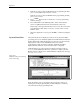
Figure 4-24
Checking the Front-to-Back
Alignment (looking from the
perspective of the input track)
PROGRAM/TEST ONLY
USE ARROW KEYS TO ALIGN BEAM WITH
DEVICE CENTER. PRESS [D] TO LOWER BEAM.
PRESS START TO CONTINUE.
1859-2
X
4
X1
X3
FRONT
OF 2500