
User manual





Operation
ProMaster 2500 User Manual 4-29
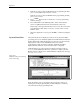
8. Press and hold
D
on the 2500’s keyboard to lower the device into the
programming block so you can check the alignment. You may also
lower the beam with your hand by pushing on either side of the
beam’s limit bar (see Figure 1-7). Pushing on the beam head or any
other part of the beam might distort the alignment.
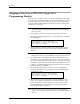
Figure 4-23
Aligning Device to the Module
PIN 1
1858-1
FRONT PANEL
ARROW KEYS
X2
X4
3
X