
User manual





Operation
4-28 ProMaster 2500 User Manual
4. Press
←
and
→
to center the chuck over the device (left-to-right).
Pressing the arrow key once moves the beam one small step in that
direction.
Note: You can change beam alignment while a Task is running. When the beam
hesitates above the device, press
STOP
and use the front panel arrow keys.
5. Press and hold
D
on the 2500’s keyboard to lower the beam and
check the position of the chuck on the device. For a slower insertion,
lower the beam manually by pushing directly on the top of the beam
assembly, on either side of the beam’s limit bar (the limit bar is shown
in Figure 1-7).
Adjust the left-to-right position as necessary. When the beam is
centered, press
START
.
6. The beam picks up the device, rotates it 90
°
, moves it over the
programming module, and pauses before inserting the device in the
block. The 2500 displays:
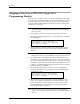
Align Device to Module
7. Press
←
and
→
to center the device over the programming module
(left-to-right when you stand in front of the 2500).
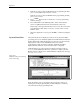
Figure 4-22
Aligning Beam to the Device
PROGRAM/TEST ONLY
USE ARROW KEYS TO ALIGN DEVICE WITH
PROG. MODULE. PRESS [D] TO LOWER BEAM.
PRESS START TO CONTINUE.
FRONT PANEL ARROW KEYS
1857-1