
User manual





Operation
ProMaster 2500 User Manual 4-27
Aligning a Device to a PLCC Programming Module
Whenever you run a new TaskLink Task or Kit using a PLCC device, the
display on the 2500 prompts you to align the beam. Follow the procedure
below to adjust the position of the beam so that it picks the device at its
center and inserts the device into the programming module correctly.
Failure to perform the alignment and cleaning procedures may cause
premature wear of the module’s contacts and an eventual decrease in
programming yield.
Note: This alignment procedure assumes that the devices are
square PLCCs,
with pin 1 oriented toward the back of the input track
(away from
the front of the 2500). Alignment of rectangular, 32-pin PLCC devices is
described on page 4-32.
Align Beam to the Device
Follow these steps to align the beam to a device in the input track.
1. Insert a tube of devices into the input track and close the hood.
2. Start the new Task.
3. The beam positions itself over the first device and pauses. The 2500
displays:
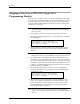
PROGRAM/TEST ONLY
USE ARROW KEYS TO ALIGN BEAM WITH
DEVICE CENTER. PRESS [D] TO LOWER BEAM.
PRESS START TO CONTINUE.