
User manual







Operation
ProMaster 2500 User Manual 4-25
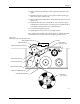
Sumcheck Status Box
Depending on how the administrator configured the Task, this box may
appear if you download your device programming data from a file or
load a master device. The recorded sumcheck may be displayed
(depending on how the Task was written) so you can confirm the number
with your paper documentation. Press
↵
to continue or
E
SC
to abort the
Task if there is an error.
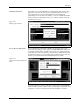
Process Devices Dialog Box
Once TaskLink has loaded data in RAM to program the devices, the
Process Devices dialog box may appear. The
Pass Limit
field enables you
to enter the number of devices that you are going to program using this
Task. When you enter any number (other than zero), TaskLink will count
the number of devices you programmed successfully and stop when the
number you entered in the Pass Limit field has been reached.
Count the number of parts in a full tube and enter this in the
Parts/tube
field. The 2500 counts the number of devices entering the output tube and
prompts you to insert an empty tube when that number is reached.
Figure 4-20
Checking the Sumcheck
Figure 4-21
Setting Pass Limit and Parts Per
Tube