
User manual







Operation
ProMaster 2500 User Manual 4-23
Running a Task
Start TaskLink at the DOS prompt in the directory where TaskLink is
installed. Type:
tl
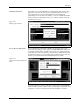
After a few seconds, the Run Task/Kit list box appears (similar to the one
shown in Figure 4-2). A Kit is a special collection of Tasks, which will be
explained later in this chapter. For now, ignore all references to Kits.
The Tasks and Kits available in the current Task/Kit database file (shown
in the
Task/Kit Database
entry field) are listed in the
Task/Kit
list box.
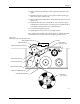
Figure 4-17
Installing Devices in the Tube Holder
Figure 4-18
Main Operator Screen in TaskLink
1854-3
NOTCHED
CORNER
INPUT TUBE
HOLDER
INPUT TUBE
HOLDER
TUBE INSERTED
WITH DEVICE
CONTACTS
FACING UP
TUBE INSERTED
WITH DEVICE
CONTACTS
FACING UP
SQUARE
PLCC
DEVICES
DIP/SOIC
DEVICES
PIN 1
PIN 1