
User manual







Operation
4-18 ProMaster 2500 User Manual
Loading Labels
The 2500 labeler prints using either a 24-wire in-line dot matrix printer or
a thermal printer. Labels usually need to be changed each time a new
device package type or different pin count is required by the Task you are
going to run. Labels are positioned on a non-adhesive liner material so
they will peel easily as they advance around the label platen’s point. The
label part number and date code are written on a label attached to the
inside of the label roll.
Note: The label part number is marked on the inner cardboard reel. You can
identify a roll of ProMaster 2500 labels by the “QF” prefix in the part
number. Labels for other Data I/O products will look the same but cannot
be used on the 2500.
The 2500 allows you to adjust where the label is applied on the device.
This parameter, called label placement, will usually be changed by the
system administrator. To place the label, the 2500’s labeler must know
where the labels are on the liner and must be able to advance the liner so
the label contacts the device at the correct time. The label detection optic
assembly (known as the ADC optic) detects the leading edge of the label
so the label drive motor can position it for correct application to the
device.
If you are switching between Kapton™ and polyester labels, check the
ADC optic value (see page 5-34) and adjust it as required so that it reads
200
when reading the label on the liner. The ADC value changes slightly
for these two label material types.
Follow the instructions in the following sections for threading the new
label stock through the appropriate printer type’s assembly.
Loading Labels in the Dot
Matrix Printer
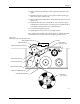
Rollers and other components of the labeler are referred to by letters in
this section to make the threading instructions easier to follow.
Refer to Figure 4-15 andthefollowingproceduretoinstallarolloflabels.
1. Raise the application plate and slide rollers
B
and
F
in the direction
shown by the arrows in Figure 4-15. This prepares the path of the
labels to be threaded through the labeler.
2. On a standard reel, the label release knob is attached to a core pin that
holds the label roll in place. Loosen the label release knob just enough
to move it toward the center of the reel (so that the core pin no longer
protrudes), and lock the knob in this retracted position.
For a magnetic supply reel, remove the plate.
3. If labels are already installed, unthread the liner, and remove the old
label roll by putting your thumbs in the cut-outs in the supply reel
and rocking the roll back and forth as you pull it off.
4. Install the labels on the supply reel so that the label liner passes to the
left of optic
A
(see Figure 4-15).
5. If the 2500 uses a standard reel, loosen the release knob and push the
pin into the cardboard core of the label roll. Tighten the knob to hold
the pin in place against the roll’s cardboard roll.
If the 2500 uses a magnetic supply reel, reinstall the plate.