
User manual


Operation
ProMaster 2500 User Manual 4-15
The device keeper bar assembly attaches to the mounting block with a pin
that has a detent ball on the tapered end and a handle ring on the other
end (see Figure 4-12). This allows the device keeper bar assembly to be
installed easily and when processing 150 mil SOIC devices, and removed
easily when processing other devices.
Before you start a Task, install the keeper bar assembly block to the
keeper bar mounting block, which should be already be attached to the
inside of the input track with two -inch hex screws.
Attach the 8-pin 150-mil SOIC device keeper assembly by performing the
following procedure.
1. Insert the end of the keeper bar assembly block into the notch in the
top of the mounting block, with the keeper bar pointing to the left.
2. Insert the locking pin into the hole in the left side of the block, and
push it all the way in until you feel the detent ball click into place.
3. Swing the keeper bar toward you so that it is parallel to the input
track.
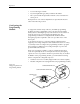
Figure 4-11
Closeup View of Input Track with 8-pin 150-mil Device Keeper Bar Assembly Installed
2500-1
332
⁄