
User manual


Operation
ProMaster 2500 User Manual 4-13
1. Remove devices from all three track sections.
2. Turn the track width adjustment knob counterclockwise until the
track is at its narrowest setting. This step is important because it
prepares the three track sections to be adjusted together and
uniformly.
3. Begin opening (widening) the track.
4. Before the track opens as wide as the device you will be using, place
one of the devices (with its leads up) in the input track next to the
programming station’s stop guide. See Figure 4-10.
The device should be resting on the rear wall of the track (see Figure
4-10) and should block the optic.
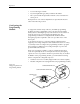
Figure 4-9
Adjusting the Track Width — Turning the knob clockwise opens all three track sections together.
TRACK WIDTH
ADJUSTMENT KNOB
DEVICE INDENT
1856-2