
User manual




Operation
4-6 ProMaster 2500 User Manual
Entering Your
Password
The system administrator may configure your ProMaster 2500 for a
security level that requires you to enter a password before you see the
main TaskLink screen. If your system is configured in this way, the first
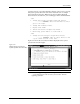
screen you see after starting TaskLink is a security screen (see Figure 4-3).
Enter your username as the system administrator has defined it for the
2500. Press
↵
.
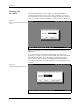
A second security screen is displayed (see Figure 4-4). This screen
prompts you to enter your password. The default password is
password
.
Enter this the first time you use the 2500. You can enter a personal
password at any time by selecting the
Change Password
pushbutton.
You will be prompted to enter and confirm the new password before it is
accepted.
Figure 4-3
Enter Your Name on the Security
Screen
Figure 4-4
TaskLink Main Operator Screen