
User manual




Tasks and Kits
ProMaster 2500 User Manual 3-37
Type the message you want TaskLink to display on the screen to prompt
the system operator before the start of the next Task. Part of a sample
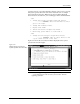
tl.msg text file showing the ~0001 message that would be displayed
before Task 2 is shown below, as it would appear in the unformatted file.
~0001
1. Change 2500 setup to program 32-pin DIP devices.
-----> REMEMBER: This is a DIP device so Pin 1
goes to the right.
2. Change and calibrate labels.
3. Adjust track width.
4. Insert new devices in input tube holder.
5. When ready, press “Enter” to start Task 2.
~0002
1. Change the 2500 setup for 20-pin PLCC devices.
-----> REMEMBER: This is a PLCC device so Pin
1 goes toward the back of the 2500....
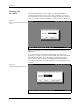
Figure 3-27 shows the screen that would be displayed for the system
operator before Task 2 begins.
Note: The
\b
code toggles bolding of text. Bolding does not wrap to the next line
— if you want bold text on the next line, you must enter
\b
at the
beginning of that line.
Figure 3-27
Sample Message Presented to
System Operator when Kit Is Run