
User manual


Tasks and Kits
3-28 ProMaster 2500 User Manual
Programmer Interface
— When this command is selected, TaskLink
automatically displays a new set of menus so you can run diagnostic tests
on the programming electronics. Refer to Chapter 5 for more information
on running diagnostics on the programming electronics.
VT100 on Programmer Port
— Select this command when you update
the
Algorithm/System
disk(s). A description of this update procedure is
included with the
ProMaster 2500 User Notes
that are distributed
periodically.
Device List Update
and
Task Database Device Check
— After you
install the new Algorithm disk(s), follow the procedures to update the
device list and then to check the Task database before running your
existing Tasks or creating new ones. If you do not complete all the steps
in the update procedure, TaskLink may occasionally report error
messages indicating that the device in your Task could not be found.
ProMaster Package Update
—You will be notified in the
ProMaster 2500
User Notes
when support for new package types have been added, and
the Notes will instruct you to install new firmware EPROM(S) in the 2500.
TaskLink will need to be updated with the new package type(s) so it can
display them as options in the ProMaster 2500 dialog box. Select this
option to have TaskLink upload the new package information.
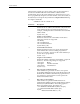
Figure 3-17
Utilities Pull-down Menu