
User Manual


User Manual
37
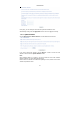
– SIP Outbound Proxy port: The port that the outbound
proxy is listening on. By default, the port value is 5060.
Use SIP Registrar: Select the checkbox of Use SIP Registrar to register
with the proxy. You can register your user ID on the SIP registrar. SIP
registrar works with SIP proxy, allowing other parties to call DSL router
through it. When it is selected, the following fields appear.
– SIP Registrar: The IP address of the SIP registrar.
– SIP Registrar port: The port that SIP registrar is listening
on. By default, the port value is 5060.
Account Enabled: If it is unselected, the corresponding account is disabled.
You can not use it to initiate or accept any call.
Polarity Reverse Enable: Enable or disable this function.
Authentication name: Set the user name of authentication.
Password: Set the password of authentication.
Cid Name: User name. It is the Display Name.
Cid Number: Set the caller number. It must be a number of 0~9.
ptime: You can use it to set the packetization time (PT). The PT is the length
of the digital voice segment that each packet holds. The default is 20
millisecond packets. If selecting 10 millisecond, packets improve the voice
quality. Because of the packet loss, less information is lost, but more loads
on the network traffic.
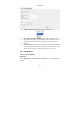
Priority: The priority of codec is declined from up to down. Codecs define the
method of relaying voice data. Different codecs have different characteristics,
such as data compression and voice quality. For Example, G723 is a codec
that uses compression, therefore, it is good for use where the bandwidth is
limited but its voice quality is not good as other codecs, such as the G711. If
you specify none of the codecs, using the default value showed in the above
figure, the DSL router chooses the codec automatically.
After setting, click Apply to take the settings in to effect.