
User guide




Dugan Model E User Guide Web Control Panel
28
5.2 Operation
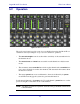
Figure 5-4 Web Control Panel
The web control panel provides controls not available when using the Model E as a
standalone device (See Chapter 4: Operation for standalone operation):
• The auto mix weight controls set the relative sensitivity of the automatic mix for
the channels in use.
• The manual, auto, and mute buttons transition each channel smoothly between
modes.
• The momentary master
override button fades up the channels whose override func-
tion is active and fades down the other channels. The automatic mix resumes when
the button is released.
• The master
preset button sets each channel to the mode indicated by its preset
mode LED. Powering up the system also performs this function.
Set the unused channels to the mute mode. Use each channel’s preset button to set the
preset mode lights to match the modes of the channels.
NOTE: The Model E continues to perform automatic mixing if the Web Control Panel
is disconnected.