
User guide





Dugan Model E-3 User Guide Dugan Control Panel
49
8. On the console, set a ballpark level using the preamp gain of the music system
threshold’s mic so all music system channels hover around -15 dB.
Subsequently, use the Master music system threshold settings to fine tune the mas-
ter threshold for each group.
If all the channel auto mix gain displays stay at full gain, the threshold signal is
missing or too low.
9. Fine tune individual channels using their thresh controls so the auto mix gain dis-
play stays close to -15 dB.
Enter a value in the numeric field (see page 34 to learn how).
Controlling Ambience
The Music System does not maintain constant ambience like the Speech System. If
the gating of the ambience is annoying, its effect can be smoothed:
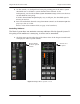
1. Click the arrow on the right edge of the Master Pane of the Dugan Control Panel
to display the Music System controls.
Figure 5-15 Dugan Music System controls
Click to display
the music system
controls
Click to close
this panel