
User guide





Dugan Model E-3 User Guide
42
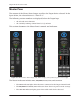
Master Pane
The content of the Master Pane changes to reflect the Dugan device selected. In the
figure below, the selected device is “Dan’s E-3.”
The following version numbers are displayed below the Dugan logo.
• the selected unit’s firmware
• the currently running Control Panel (CP-J) software
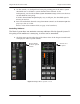
This section documents the Master Pane’s controls and indicators.
Figure 5-11 Master Pane: AES settings (left), ADAT settings (center), Music System controls (right)
The Master indicators include online, AES/ADAT, master/slave, and clock lock.
•Theonline indicator lights when the unit is connected to the Dugan Control Panel.
•TheAES/ADAT and master/slave indicators show their rear panel switch settings.
•Theclock lock indicator lights green when valid word clock is detected.