
User guide



Dugan Model E-3 User Guide Dugan Control Panel
39
Meters
The meters have three display modes.
Table 5-1 Meter modes
The default meter display is auto mix gain. This is the most useful choice during normal
operation; the input and output meters are only used when setting or checking levels.
Click on the Master meters button to toggle through the three meter display modes.
Weight Controls
The weight controls set the side-chain levels for each channel into the control sys-
tem. This establishes the relative sensitivity of the automatic mix for the channels
in use. They do not change the mix levels. When the
weight controls are balanced, each
mic has an equal opportunity to take over the system: when one person talks into
one mic, he/she gets all the
auto mix gain and the others get turned down.
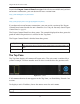
Figure 5-8 Weight controls
The weight controls should be used to balance the channel auto mix gain indicators
when no one is talking. If a console preamp trimmer is turned down, that channel’s
weight control can be turned up to re-balance the automixing, and vice-versa.
To adjust the weight setting, click and drag the
weight slider or enter a number in the
numeric field. Ctrl-click the
weight slider to reset it to 0.
Touch and hold the weight slider to reset its value to 0.
Meter Displays Meter Color
auto mix gain action of the Dugan Speech System green
input input level yellow
output output level blue
iPad