
User guide





Dugan Model E-3 User Guide
22
We strongly recommend that Windows users turn the Windows firewall off. The
Windows Firewall blocks port 9776 used by the Dugan software to communicate. If
you must leave the Windows firewall on, either open this port or use the workaround
described in Connecting when Windows Firewall is On on page 26.
We recommend turning off the computer’s WiFi during this process because it some-
times interferes. You can turn it back on after the connection has been established.
For those who wish to set a specific IP address, proceed to Software Configuration for a
Specific IP Address on page 25.
Establishing Network Connections
We recommend completing your network connection with a computer before using the
iPad app.
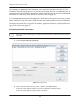
1. Launch Dugan-Utility-yyyymmdd.jar.
Figure 3-6 Dugan Utility
2. Wait a minute and if the list pane is blank, click Refresh List.
If the list pane remains blank, proceed to Manually Add Unit below.
If the list pane displays Dugan units, continue.
iPad