
User`s manual




26 • Installing the Genie Camera Genie HM Series-GigE Vision Camera
Interrupt Moderation Rate
The Intel Pro/1000 Network adapter provides a configuration parameter to manually adjust the NIC interrupt rate.
By default the NIC driver sets this to 'Adaptive' where the interrupt rate automatically balances packet transmission
interrupts and host CPU performance. In most cases no manual optimization of the Interrupt Moderation Rate
parameter is required.
In some conditions, video frames from the Genie may be transferred to host display or memory buffer as data bursts
instead of a smooth continuous stream. The NIC may be over-moderating acquisition interrupts to avoid over-
loading the host CPU with interrupts. If priority is required for acquisition transfers (i.e. a more real-time system
response to the Genie transfer), the moderation rate should be reduced by manually adjusting the NIC parameter
(see following section on advanced configuration properties).
Adjust NIC Advanced Configuration Properties
Note that the following applies to the Intel Pro NIC driver. Other NIC products may or may not have similar
configuration parameters. Screen shots below were made with Intel Pro driver version 8.10.3.0.
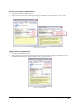
• From the Start menu go to Settings • Control Panel • Network Connections and select the NIC used to
connect the Genie to.
• Open the Properties for the Ethernet GigE NIC used with the Genie.
• Click the Configure button.
GigE NIC Configuration
• The Intel Pro/1000 NIC offers a number of options but for Genie applications the following three are typically
modified to optimize Genie capture transfers.