
User`s manual




Genie HM Series-GigE Vision Camera Troubleshooting • 139
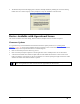
• The DALSA Sapera Network Imaging Driver must be manually installed by enabling the driver and clicking
install. Click on "Continue Anyway" when prompted to verify the installation as shown below.
Device Available with Operational Issues
This section considers issues with cabling, Ethernet switches, multiple cameras, and camera exposure.
Firmware Updates
As a general rule any Genie installation must include the firmware update procedure (see "Updating Genie
Firmware" on page 30). Genie camera firmware that does not match a newer version of installed Genie Framework
software is likely to have unpredictable behavior. Problems might be:
• Genie is not found by the device discovery process.
• Genie is found by the Sapera GigE Server but an application such as CamExpert does not see the camera.
• A Genie that had a fault with a firmware update will boot with default safe firmware. In this case the Genie
behaves normally as a network device but can not function as a camera. Opening the GigE Vision device status
will show the Genie name field as Firmware required.
Important: New Genie cameras installed in previously deployed systems are fully backward compatible with the
older vision application. New Genie cameras must not be programmed with older firmware.