
User`s manual




136 • Troubleshooting Genie HM Series-GigE Vision Camera
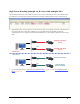
GigE Server Warning Example 1b: IP error with multiple NICs
As a second example, the screenshot below shows an IP conflict error similar to the example above but the second
NIC has no camera connected (or only an Ethernet switch).
• The following illustration shows an example of this fault condition. The second NIC has no Genie connected
ether directly or via a switch.
Default LLA mode
(error)
Default LLA mode
(error)
Default LLA mode
DALSA DHCP
Server enabled
setup error
valid setup
NIC 1
NIC 2
NIC 1
NIC 2
switch
switch
• The solution again is that the second NIC must use the persistent IP mode or must have a DHCP server on that
subnet (note that the DALSA Network Configuration Tool can configure the DALSA Smart DHCP Server).
• For more information see "
Using Genie with Ethernet Switches" on page 93, and "IP Configuration Mode
Details" on page 93.