
User`s manual





Genie HM Series-GigE Vision Camera Network Overview & Tools • 103
Sapera GigE Server Details
This section provides additional details on the GigE Server not covered in the Genie installation instructions.
Generally the Genie automatic installation requires no user intervention.
• The Sapera GigE Server implements the GigE Vision Control Protocol (GVCP). This provides the interface to
generate GVCP messages to control and configure a GigE Vision device.
• GigE Server handles the heartbeat messages, allowing an application in development, to be single-stepped
while in debug mode, without loss of the camera connection.
• GigE Server is a single application going through the firewall. This simplifies firewall settings as only this
application needs to be listed in the firewall exceptions.
• The GigE Server periodically rescans the network to discover any new camera that might have been added to
the network. This will also identify devices removed.
• When required, it is possible to disabled the GigE server. A Sapera application will then directly be linked to
the library responsible for GigE Vision control channel communications. This can be used to minimize inter-
process communications.
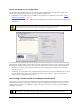
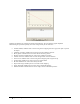
• The GigE Server Status window provides valuable information about the GigE Vision devices present on your
system (see "
Troubleshooting" on page 131).