
User`s manual





Genie HM Series-GigE Vision Camera Network Overview & Tools • 99
• The default time period is 15 seconds.
• This time interval can be increased if changes to the number of connected cameras is seldom made.
• Otherwise in the case where cameras are connected through an Ethernet switch, the Auto Discovery period
should be shortened if most GigE Vision connect/disconnect events must be seen by the Sapera application
(see "
Sapera Callbacks" on page 72).
• Windows Firewall Exception List: By default the DALSA GigE Server is added to the Windows Firewall
exception list. This ensures the Windows Firewall remains active (if it was enabled) without having to
individually put each Genie application program in the exception list. If the computer is using a different
firewall software package, refer to that firewall's software manual to allow the GigE Server to have access
through it.
Alternatively, it is possible to exclude a specified NIC from using the firewall. The NIC dedicated to the GigE
Vision network does not need Windows firewall. See "
Disabling Windows Firewall" on page 141 for details on
excluding a NIC from firewall settings.
• Broadcast Device Conflict Detection: By default the DALSA GigE Server attempts to detect and identify IP
network conflicts. This broadcast mechanism consumes CPU cycles which may interfere with image data in a
network using multiple cameras. When a multiple camera system is defined, tested and declared stable, the
device conflict detection function can be disabled.
System Configuration
System DHCP Server Parameters
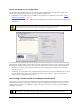
The DHCP Server tab has configuration parameters for general system DHCP server operation. For most setups the
default settings are sufficient. Note that the DHCP server is activated on a chosen NIC via a selection made on the
NIC configuration (see "
NIC IP and DHCP Server Configuration" on page 101).
• Default Lease Time
By default the DHCP server will assign a GigE Vision device an IP address and will always use that same
address whenever that GigE Vision device is reconnected (the server maps the IP address to the device MAC
address). If a finite time is desired, un-check the Infinite selection box and enter the lease time on hours or days.
• Server Response Time
The parameter sets the time interval for the DHCP server to acknowledge a connected device and assign an IP
address. By default the default interval is 0 seconds but can be set to a longer period to reduce polling overhead
when a GigE Vision setup is not changed frequently.