
Datasheet


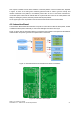




One Joystick controller box has been created to control the platform. On that controller box, depicted
in Figure 18, there is an analog auto centered joystick that will be used to give the velocity and
rotation commands to the platform, one ON/OFF press button to turn on and off the controller box,
one Enable press button that will indicate that the Joystick will take control of the robot platform and
finally one Emergency button, that when pressed will stop the platform.
On the upper right corner is possible to see the antenna that will be used to send the data.
4.6. Interaction Board
The Interaction Board allows the Interaction Computer to control the arm with the laser pointer, enable
or disable the laser pointer and finally to control the LED lights around the robot eyes.
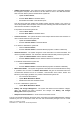
Figure 19 shows how the Interaction Board is connected to the Interaction Computer and the different
communication and power types that are implemented on the board.
FROG – FP7 STREP nr. 288235
Deliverable: D1.4 – Platform User and Developer Manual 25
Figure 19: Interaction Board Communication and Power connections
Figure 20: Interaction Board layout